-
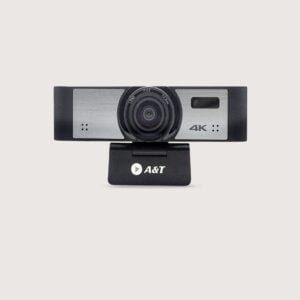
USB 4K Video Conferencing Camera – 110 Degree, 8 X digital zoom, built in mic, AI Tracking, Auto Framing
The USB 4K Video Conferencing Camera offers a 110-degree view, 8x digital zoom, a built-in mic, AI tracking, and auto framing. It is ideal for online meetings, video calls, and team talks.
KSh 30,000.00KSh 38,000.00Chat Us to OrderUSB 4K Video Conferencing Camera – 110 Degree, 8 X digital zoom, built in mic, AI Tracking, Auto Framing
KSh 30,000.00KSh 38,000.00 -
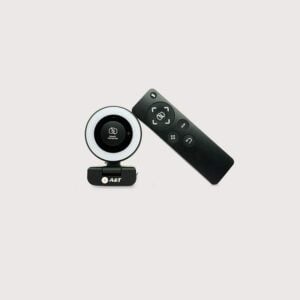
USB 1080p 60FPS Web Camera with Built-in Mic, Remote and Privacy Shutter
The USB 1080p 60FPS Web Camera features a 90-degree field of view, built-in microphone, remote control, 360-degree manual rotation, and magnetic privacy shutter. It is suitable for video calls, online meetings, streaming, and virtual learning.
KSh 12,300.00KSh 15,000.00Chat Us to OrderUSB 1080p 60FPS Web Camera with Built-in Mic, Remote and Privacy Shutter
KSh 12,300.00KSh 15,000.00 -
USB Full HD 1080p Web Camera with Built-in Microphone and Privacy Shutter
The USB Full HD 1080p Web Camera features a built-in microphone, a 60-degree field of view, manual rotation, and a privacy shutter. It is suitable for online meetings, video calls, virtual classes, and everyday communication.
KSh 3,450.00KSh 5,000.00Chat Us to OrderUSB Full HD 1080p Web Camera with Built-in Microphone and Privacy Shutter
KSh 3,450.00KSh 5,000.00
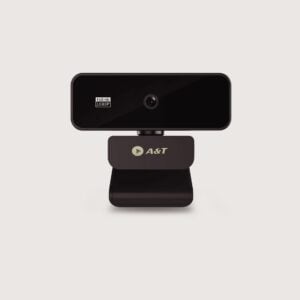
Web Cameras
Smart Boards Kenya offers web cameras designed to improve video quality for online meetings, virtual classes, video conferencing, and live streaming. Whether you are working from home, attending virtual meetings, teaching online, or equipping a corporate boardroom, the right webcam helps you communicate clearly and professionally.
Our webcam category caters to individuals, businesses, schools, universities, training centres, and organisations looking for reliable video communication solutions. Depending on the model, features may include Full HD or 4K video, autofocus, built-in microphones, privacy shutters, wide-angle lenses, and USB connectivity.
Explore available options and choose a webcam that matches your device, room size, lighting conditions, and communication requirements.
Benefits of Web Cameras
- Clear video communication: Improve your appearance and visibility during virtual meetings and online classes.
- Support remote working: Connect with colleagues, clients, and teams through compatible video conferencing platforms.
- Enhance online learning: Help teachers, trainers, and students participate in virtual lessons.
- Improve presentation quality: Capture video for demonstrations, webinars, and professional presentations.
- Convenient connectivity: Many webcams connect to compatible computers through USB.
- Flexible installation: Select models offer adjustable mounts, tripod compatibility, or flexible positioning.
- Additional audio features: Certain webcams include built-in microphones, although dedicated microphones may be preferable for larger rooms.
Types of Web Cameras
HD Web Cameras
Suitable for everyday video calls, remote working, online learning, and general communication. Supported resolutions and frame rates vary by model.
Full HD Webcams
Typically support 1920 × 1080 video and are suitable for professional online meetings, interviews, and virtual presentations.
4K Web Cameras
Designed for higher-resolution video capture, subject to compatible software, computer performance, lighting, and platform support.
Business and Conference Webcams
Suitable for individual workstations, small meeting spaces, and professional video calls. Some models offer wider fields of view and enhanced image processing.
Webcams with Built-In Microphones
Combine video capture with integrated audio pickup for convenient communication. Microphone performance depends on room acoustics, distance, and the specific model.
Wide-Angle Web Cameras
Designed to capture a broader field of view, making selected models suitable for small group meetings and collaborative workspaces.
Streaming and Content-Creation Webcams
Suitable for webinars, online demonstrations, training videos, and live content creation, with features varying by model.
Where Can You Use Web Cameras?
- Corporate offices: Support online meetings, interviews, and remote collaboration.
- Home offices: Improve video calls and remote working experiences.
- Schools and universities: Enable online teaching, virtual classes, and distance learning.
- Training centres: Support webinars, demonstrations, and remote training.
- Customer service teams: Facilitate video-based customer interactions and consultations.
- Content creation: Record presentations, tutorials, and compatible live-streaming content.
- Small meeting rooms: Support video calls and collaboration when paired with suitable conferencing software and audio equipment.
How to Choose the Right Web Camera
Before purchasing a webcam, consider the following:
- Video resolution: Choose HD, Full HD, or 4K based on your video quality requirements and available bandwidth.
- Frame rate: Check supported frame rates for smoother video during meetings, demonstrations, or streaming.
- Field of view: Select a standard view for individual calls or a wider view for small groups.
- Autofocus and low-light performance: Consider these features if you move during presentations or work in variable lighting.
- Microphone quality: Determine whether the built-in microphone is sufficient or whether a dedicated microphone is required.
- Connectivity: Verify USB-A, USB-C, or other supported connection types and check compatibility with your computer.
- Software compatibility: Confirm support for your operating system and preferred video conferencing applications.
- Mounting options: Check monitor clips, tripod mounts, privacy shutters, and cable length.
- Room requirements: For larger conference rooms, consider a dedicated PTZ or conference camera rather than a standard desktop webcam.
Why Buy Web Cameras from Smart Boards Kenya?
Smart Boards Kenya helps individuals, businesses, schools, and institutions find webcams suited to their video communication needs.
- Webcam options for offices, home working, online learning, and professional communication.
- Solutions for compatible laptops, desktop computers, and video conferencing setups.
- Guidance on resolution, connectivity, audio features, and compatibility.
- Product options subject to availability and individual model specifications.
Contact Smart Boards Kenya
- Website: https://smartboards.co.ke
- Email: sales@smartboards.co.ke
- Phone/WhatsApp: +254 751 626 694
Contact our team for product recommendations, current availability, and quotations.
Frequently Asked Questions
What is a webcam used for?
A webcam captures video for online meetings, video calls, virtual classes, webinars, interviews, and content creation.
Is a Full HD webcam suitable for online meetings?
Yes. A Full HD webcam is suitable for many professional meetings and online classes, provided the computer, software, lighting, and internet connection support good-quality video.
Can I use a webcam with an interactive whiteboard?
Many interactive displays can work with compatible USB webcams and conferencing software. Check the display’s operating system, available USB ports, and supported applications before purchasing.
Do all webcams have built-in microphones?
No. Some webcams include microphones, while others rely on a separate microphone or the computer’s audio system.
Should I buy a webcam or a PTZ conference camera?
A standard webcam is generally suitable for an individual workstation or small setup. A PTZ conference camera may be more appropriate for larger meeting rooms that require remote pan, tilt, zoom, or broader room coverage.
Where can I buy web cameras in Kenya?
Contact Smart Boards Kenya through smartboards.co.ke, sales@smartboards.co.ke, or +254 751 626 694 to enquire about available webcams, specifications, and pricing.