-
1080p30 Professional Recorder and Streamer with 4 Video Inputs
The 1080p30 Professional Recorder and Streamer supports four video inputs: one HDMI and three IP. It features audio input, one HDMI output, and a 1TB HDD upgradeable to 4TB for expanded recording storage.
KSh 402,500.00KSh 430,500.00Chat Us to Order1080p30 Professional Recorder and Streamer with 4 Video Inputs
KSh 402,500.00KSh 430,500.00 -
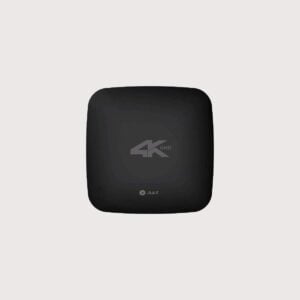
4K Professional One Touch Recorder and Streamer with 5 video input, audio in, 2 HDMI
The 4K Professional One-Touch Recorder and Streamer supports five video inputs, audio input, and two HDMI outputs. It is suitable for professional recording, live streaming, meetings, lectures, and event production.
KSh 935,500.00KSh 950,000.00Chat Us to Order4K Professional One Touch Recorder and Streamer with 5 video input, audio in, 2 HDMI
KSh 935,500.00KSh 950,000.00 -
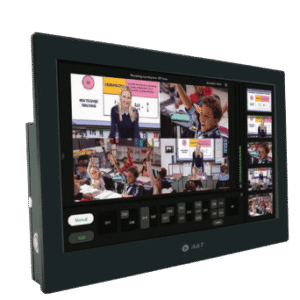
1080p Professional One-Touch Recorder and Streamer with 13.3-Inch Touch Display
The 1080p Professional One-Touch Recorder and Streamer features five video inputs, audio input, two HDMI outputs, and a 13.3-inch touch display. Additionally, it includes a 1TB HDD with upgrade support up to 4TB for compatible recording and streaming workflows.
KSh 747,200.00KSh 760,500.00Chat Us to Order1080p Professional One-Touch Recorder and Streamer with 13.3-Inch Touch Display
KSh 747,200.00KSh 760,500.00 -
4K Video recorder – HDMI in and out with 4 K recorded Video Out
The 4K Video Recorder features HDMI input and output for compatible video equipment. Additionally, it supports 4K recorded video output, making it suitable for professional recording, presentations, training, and audio-visual applications.
KSh 79,500.00KSh 82,500.00Chat Us to Order4K Video recorder – HDMI in and out with 4 K recorded Video Out
KSh 79,500.00KSh 82,500.00
Video Recorders
Smart Boards Kenya supplies video recording solutions for businesses, schools, universities, conference facilities, and professional AV installations. Video recorders help capture meetings, presentations, lectures, training sessions, interviews, and other important events for future reference, review, or distribution.
Whether you need to record a classroom lesson, document a boardroom meeting, capture a presentation, or integrate recording into a video conferencing setup, choosing the right recorder helps ensure your content is captured in a format suitable for your workflow.
Recording inputs, supported resolutions, storage capacity, audio features, streaming capabilities, and compatibility vary by model.
Benefits of Video Recorders
- Capture important meetings: Record discussions, presentations, and training sessions for later review.
- Support education and training: Preserve lectures, demonstrations, and learning materials for revision and knowledge sharing.
- Improve documentation: Maintain recordings of authorised meetings, interviews, and professional events.
- Enable content production: Capture video from compatible cameras, computers, and AV systems.
- Support flexible workflows: Select recording formats and storage options that suit your organisation.
- Integrate with AV equipment: Connect compatible cameras, microphones, video conferencing systems, and displays.
Types of Video Recorders
HDMI Video Recorders
Capture video from compatible HDMI sources, such as computers, cameras, and presentation systems. Check the supported resolution, frame rate, input restrictions, and audio handling before purchase.
Conference and Meeting Recorders
Designed for recording meetings, presentations, and collaborative sessions. Depending on the setup, recording may involve a dedicated recorder, video conferencing system, or connected computer.
Lecture and Classroom Recording Systems
Support the capture of teaching sessions, demonstrations, and presentations for educational use, subject to the recording system’s capabilities.
Multi-Channel Video Recorders
Record from multiple supported video inputs or sources, depending on the device. These are useful for workflows that require several camera angles or AV feeds.
Portable Video Recorders
Compact devices designed for recording compatible video sources in different locations, including training rooms, presentations, and field production environments.
Network-Based Recording Solutions
Selected systems record or manage video streams over compatible networks. Confirm supported streaming protocols, network requirements, and storage capabilities.
Video Conferencing Recording Solutions
Capture online meetings and hybrid presentations using compatible conferencing platforms, dedicated hardware, or approved software-based recording systems.
Where Can You Use Video Recorders?
- Schools and universities: Record lectures, demonstrations, and educational presentations.
- Corporate boardrooms: Document authorised meetings, briefings, and presentations.
- Training centres: Capture instructional sessions for staff development and future reference.
- Conference facilities: Record seminars, workshops, and professional events.
- Media and content production: Capture supported camera feeds and presentation sources.
- Government and institutional offices: Maintain authorised recordings in accordance with applicable policies.
- Hybrid meeting environments: Record presentations involving in-room participants and remote attendees when supported by the conferencing system.
How to Choose the Right Video Recorder
Before purchasing a video recorder, consider the following:
- Recording source: Identify whether you need to record HDMI, SDI, USB, network streams, or another supported input.
- Video quality: Check the maximum recording resolution, frame rate, and supported video formats.
- Audio recording: Confirm microphone inputs, embedded audio support, and any required audio connections.
- Storage capacity: Consider internal storage, removable media, external drives, or network storage support.
- Number of inputs: Choose a device that accommodates the required cameras or video sources.
- Live streaming: If required, verify that the recorder supports your intended streaming workflow and platforms.
- Compatibility: Ensure the recorder works with your cameras, laptops, conferencing equipment, and AV system.
- File formats and workflow: Check supported file formats, export options, editing compatibility, and transfer methods.
- Security and privacy: Consider access controls, retention policies, consent requirements, and secure storage for recordings.
Why Buy Video Recorders from Smart Boards Kenya?
Smart Boards Kenya helps businesses, educational institutions, and AV integrators find recording solutions suited to their professional requirements.
- Video recording options for meetings, classrooms, presentations, and AV installations.
- Solutions for compatible cameras, computers, and conferencing equipment.
- Guidance on recording inputs, storage, video quality, and connectivity.
- Product options subject to availability and individual model specifications.
Contact Smart Boards Kenya
- Website: https://smartboards.co.ke
- Email: sales@smartboards.co.ke
- Phone/WhatsApp: +254 751 626 694
Contact our team for product recommendations, current availability, and quotations for your recording setup.
Frequently Asked Questions
What is a video recorder?
A video recorder is a device or system that captures video, often with audio, and saves it for later playback, editing, review, or distribution.
Can I record presentations from an interactive display?
This depends on the display’s built-in recording capabilities and available outputs. An external recorder may work if the display or connected source provides a compatible video signal.
Can video recorders capture HDMI signals?
Many recorders support HDMI input, but supported resolutions, frame rates, audio formats, and content restrictions vary by model.
Can I use a video recorder for online meetings?
Yes, where the recorder or conferencing platform supports the required recording workflow. Ensure that remote participants are informed and that recording complies with applicable privacy and organisational policies.
How much storage do I need for video recording?
Storage requirements depend on recording duration, resolution, frame rate, compression, and the number of video sources. Higher-quality and longer recordings generally require more storage.
Where can I buy video recorders in Kenya?
Contact Smart Boards Kenya through smartboards.co.ke, sales@smartboards.co.ke, or +254 751 626 694 to enquire about suitable products, availability, and pricing.