-
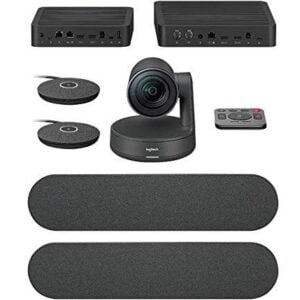
Logitech Rally Plus Camera
Logitech Rally Plus is the modular video conferencing system designed for large and extra large rooms. It offers best-in-class optics and audio, ensuring an integrated, simple, and modular video conferencing experience.
KSh 275,250.00Chat Us to OrderLogitech Rally Plus Camera
KSh 275,250.00 -
Logitech Meetup 2
Improve your virtual meetings and hybrid collaboration with the Logitech MeetUp 2 Video Conferencing System, available from Smart Boards Kenya. Designed for huddle rooms and small meeting spaces, this all-in-one conference camera combines 4K imaging, intelligent audio processing, an integrated speaker and flexible connectivity to help teams communicate more effectively.
Powered by the Logitech CollabOS platform, the MeetUp 2 features RightSight 2 camera framing and RightSound 2 audio technologies. Its wide field of view helps capture meeting participants, while the built-in microphone array and speaker provide an integrated audio-video solution for professional meetings.
KSh 130,000.00KSh 158,250.00Chat Us to OrderLogitech Meetup 2
KSh 130,000.00KSh 158,250.00 -
USB 4K Video Conferencing Camera with 12x Optical Zoom, Auto Framing and PoE
The USB 4K Video Conferencing Camera features 12x optical zoom, auto framing, gesture control, and PoE support. It offers USB 3.0, HDMI, and IP connections for compatible video systems.
KSh 175,500.00KSh 185,650.00Chat Us to OrderUSB 4K Video Conferencing Camera with 12x Optical Zoom, Auto Framing and PoE
KSh 175,500.00KSh 185,650.00
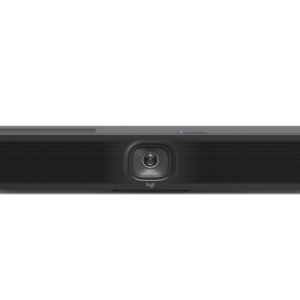
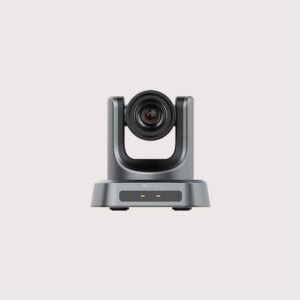
Upgrade your meetings and presentations with auto-framing PTZ video conferencing cameras in Kenya from Smart Boards Kenya. Designed for boardrooms, conference rooms, training facilities, lecture halls and hybrid meeting environments, these cameras help deliver clear video and keep participants visible during meetings.
PTZ stands for Pan, Tilt and Zoom. PTZ cameras allow users to adjust the camera’s direction and zoom level to capture different areas of a room. Models with auto-framing or AI-powered tracking can automatically adjust the view to keep speakers or meeting participants within the frame, depending on the camera’s capabilities.
Whether you are equipping a corporate boardroom, a school, a university or a professional training facility, the right PTZ conferencing camera can improve the remote meeting experience and help participants follow discussions more effectively.
Benefits of Auto-Framing PTZ Cameras
- Automatic participant framing: Selected models adjust the camera view to keep individuals or groups within the frame.
- Pan, tilt and zoom control: Capture different parts of a meeting room without manually repositioning the camera.
- Clear video quality: Choose models offering Full HD or 4K resolution, depending on your requirements.
- Speaker tracking: Supported cameras can follow an active speaker to help remote participants see who is talking.
- Wide room coverage: Pan and tilt functionality helps capture larger meeting spaces and varied seating arrangements.
- Flexible installation: Depending on the model, cameras may support USB, HDMI, IP or other professional AV connections.
- Professional conferencing: Suitable for corporate meetings, online presentations, distance learning and hybrid collaboration.
Popular PTZ Video Conferencing Camera Brands
Explore professional conferencing camera solutions from established manufacturers, subject to availability.
- Logitech: PTZ Pro 2, Rally Camera and compatible professional conferencing camera systems.
- Aver: Professional PTZ cameras and AI-powered conferencing cameras.
- PTZOptics: PTZ cameras for conferencing, streaming and professional video production.
- Lumens: Professional PTZ cameras for meeting rooms, education and AV installations.
- Yealink: Video conferencing cameras and room collaboration solutions.
- Huddly: AI-powered conferencing cameras with intelligent framing features.
- Sony: Professional PTZ cameras for conferencing, education and production environments.
- BirdDog: Professional PTZ cameras and network video solutions.
Important: Auto-framing, speaker tracking, resolution, zoom range and connectivity vary by model. Confirm the manufacturer’s specifications before selecting a camera.
Types of PTZ Video Conferencing Cameras
1. USB PTZ Cameras
USB PTZ cameras connect to compatible computers or conferencing systems and are suitable for meeting rooms, classrooms and video conferencing applications.
2. AI Auto-Framing Cameras
These cameras use supported intelligent imaging features to automatically frame individuals or groups, helping keep participants visible without constant manual adjustment.
3. Auto-Tracking PTZ Cameras
Auto-tracking models can follow a presenter or active speaker, depending on the supported tracking technology. They are useful in lecture halls, training rooms, auditoriums and presentation spaces.
4. IP PTZ Cameras
IP cameras transmit video over supported network connections and can integrate with compatible professional AV systems. Some models support network-based control and video streaming.
5. 4K PTZ Conferencing Cameras
4K models provide higher-resolution video capture and may be suitable for larger rooms or applications requiring detailed images. Actual output quality depends on the camera, connection and conferencing platform.
How to Choose the Right Auto-Framing PTZ Camera
Before purchasing a PTZ conferencing camera, consider the following factors:
- Room size: Select a camera with suitable coverage for a small meeting room, medium boardroom or large auditorium.
- Resolution: Consider Full HD or 4K based on your video quality requirements and available bandwidth.
- Optical zoom: Check the optical zoom capability if participants will be seated far from the camera.
- Auto-framing features: Confirm whether the camera supports group framing, individual framing, presenter tracking or active-speaker tracking.
- Connectivity: Check compatibility with USB, HDMI, IP streaming or other required interfaces.
- Meeting platform: Verify compatibility with your preferred video conferencing software and operating environment.
- Mounting options: Consider wall, ceiling, display or tripod mounting, depending on the camera and room layout.
- Audio requirements: Determine whether you need a separate microphone and speaker system or an integrated conferencing solution.
Buy Auto-Framing PTZ Video Conferencing Cameras in Kenya
Smart Boards Kenya provides audiovisual solutions for businesses, schools, universities and organisations looking to improve meetings, presentations and collaborative learning.
Whether you need a PTZ camera for a corporate boardroom, an AI-powered camera for a training facility or a professional camera for a lecture hall, choosing the right equipment helps create a more effective hybrid communication environment.
Contact Smart Boards Kenya for product availability, technical guidance and quotations for PTZ video conferencing cameras and compatible audiovisual equipment.
Contact Smart Boards Kenya
- Website: smartboards.co.ke
- Email: sales@smartboards.co.ke
- Phone/WhatsApp: +254 751 626 694
Frequently Asked Questions
What is a PTZ video conferencing camera?
A PTZ camera can pan horizontally, tilt vertically and zoom to capture different areas of a room. Professional models are used for video conferencing, education, presentations and live production.
What is auto-framing in a conferencing camera?
Auto-framing automatically adjusts the camera’s composition to keep individuals or groups visible. The available framing features depend on the model.
What is the difference between auto-framing and auto-tracking?
Auto-framing adjusts the camera view to fit participants within the frame. Auto-tracking follows a particular person or presenter as they move, where supported.
Are PTZ cameras suitable for boardrooms?
Yes. PTZ cameras can be useful in boardrooms because they offer flexible camera positioning and zoom. The appropriate model depends on room dimensions, seating arrangements and conferencing requirements.
Can I connect a PTZ camera to an interactive whiteboard?
Many PTZ cameras can work with compatible computers, interactive displays and conferencing systems. Check the camera’s connection requirements and the display’s supported inputs or software.
Where can I buy PTZ video conferencing cameras in Kenya?
Contact Smart Boards Kenya through smartboards.co.ke, sales@smartboards.co.ke or +254 751 626 694 to enquire about available models and suitable conferencing solutions.